OffshoreTrainer: From Training to Operational Awareness
How OffshoreTrainer evolved from a training platform into an operational awareness ecosystem connecting competence, weather intelligence, safety tools and offshore decision support.
For those who haven’t come across the project before, OffshoreTrainer is a professional mobile platform I am developing for seafarers and offshore personnel, with a particular focus on crane operators and lifting operations. The project originally grew from a simple idea: bring professional training, examination preparation and practical offshore calculations into one application that can actually be useful to someone working at sea. Today, OffshoreTrainer combines training and examination tools with lifting calculators, offshore utilities, weather intelligence, safety tools and secure P2P communication. But training someone to calculate a lift is only one part of the problem. Offshore lifting operations do not happen in a classroom. They happen on a moving vessel, under real wind, wave and swell conditions, within vessel- and operation-specific limitations, procedures and lifting plans.
And that led to another question:
Can we take ordinary marine weather data and turn it into information that is more meaningful in the context of an offshore lifting operation — without attempting to replace the professional judgement and formal controls that govern that operation? That question became the basis for the OffshoreTrainer Safety Indicator and Heading Advisory.
Safety Indicator: Turning Weather Data into Operational Awareness
Weather data tells us the conditions. But what do those conditions actually mean in the context of an offshore lifting operation? A conventional marine forecast gives us wind speed, gusts, wave height, swell, period and direction. All of this information is essential — but offshore operations require another layer of interpretation. A 1.8 m wave does not affect a vessel in exactly the same way from every direction. The vessel’s heading changes the relative angle of the sea state, which can influence the vessel’s tendency toward rolling, pitching, yawing or mixed motion. And when a load is suspended from a crane, vessel motion becomes an important part of the operational picture. The idea behind the Safety Indicator is therefore not simply to display another weather forecast.
It is to connect:
weather → vessel → lifting context → environmental-condition assessment
while keeping the actual authority to proceed where it belongs: with approved procedures, lift planning and competent personnel.
From Weather Forecast to Environmental Assessment
The system works with environmental information including:
• wind speed and gusts • wind direction • significant wave height • wave direction • swell height and direction • wave and swell period • vessel position • vessel heading
Position can be obtained from GPS or entered manually. Vessel heading can likewise come from the device compass or be entered manually. Once heading is known, OffshoreTrainer can analyse environmental conditions not only by their absolute direction, but by their relative direction to the vessel. That distinction is important. A sea approaching directly ahead and the same sea acting on the beam may have identical wave height and period, but they represent very different vessel-motion situations. The application therefore considers the environmental context rather than treating wave height as an isolated number.
Environmental Limits and Status
Environmental conditions are assessed against selectable thresholds.
The Safety Indicator currently provides three configurations:
Standard — an OffshoreTrainer reference configuration for general assessment.
Conservative — a more restrictive reference configuration where additional margin is desired.
Custom — user-defined thresholds that can be configured to reflect the applicable vessel, crane, lift plan, operational procedure or company requirements.
An important distinction needs to be made here:
The OffshoreTrainer “Standard” preset is a reference configuration within the application. It must not be interpreted as an IMCA, NORSOK, LOLER, OPITO, crane-manufacturer or company-prescribed operational limit.
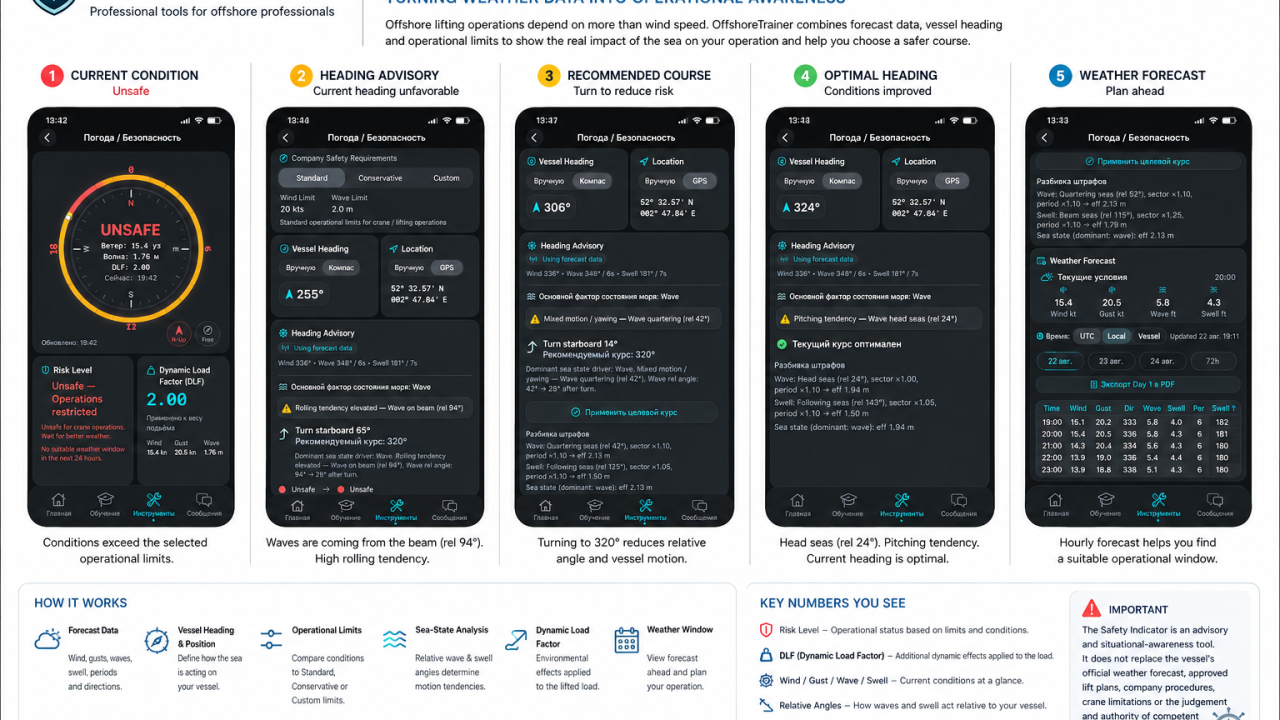
The relevant environmental parameters are compared against the selected thresholds and presented through a clear environmental-condition status. The objective is to avoid burying an important condition inside a table of weather numbers. If the selected thresholds are exceeded, the interface makes that immediately visible. A SAFE indication means only that the environmental parameters assessed by OffshoreTrainer are within the currently selected thresholds. It does not mean that the complete lifting operation has been assessed as safe, and it does not constitute authorisation to proceed. Likewise, an UNSAFE indication represents an exceedance identified by the application’s environmental assessment. Actual operational decisions remain subject to the approved lift plan, vessel and crane limitations, company procedures and the responsible competent personnel.
Dynamic Load Factor
A suspended offshore load is not influenced only by its static weight. Vessel movement and environmental conditions can introduce dynamic effects into the lifting system. Dynamic effects are therefore an important consideration in offshore lifting and cannot be assessed from static load alone. The Safety Indicator provides an indicative Dynamic Load Factor (DLF) derived from the environmental model used by the application. The displayed factor is presented together with the environmental conditions contributing to the assessment, helping illustrate how changing conditions may affect the lifting context.
However, this distinction is critical:
The OffshoreTrainer DLF is a decision-support and situational-awareness value. It is not an engineering DAF/DLF calculation for a specific lifting operation.
It does not replace:
• engineering calculations • DAF/DLF values specified by an approved lift plan • crane manufacturer requirements • crane load charts • vessel-specific calculations • company procedures or operational criteria
Actual dynamic amplification in an offshore lifting operation can depend on factors extending well beyond the environmental parameters evaluated by the application.
Why Vessel Heading Matters
This became one of the most interesting parts of the feature during development. OffshoreTrainer compares vessel heading with forecast wave and swell directions and calculates their relative angles to the vessel.
This allows the system to classify the resulting exposure into situations such as:
• head seas • following seas • beam seas • quartering seas
The application can then identify the associated motion tendency within its environmental model. For example, a significant wave component acting close to the beam may be associated with increased rolling tendency, while other relative angles may indicate pitching, yawing or mixed motion tendencies.
So the question changes from simply:
“How high are the waves?”
to:
“How is this sea state acting relative to the vessel at its current heading?”
That provides considerably more context than wave height alone.
Heading Advisory
Once the relative geometry is known, OffshoreTrainer can evaluate the vessel’s current heading against the wave and swell directions used by the application. If the sea state is acting from an unfavourable relative direction, Heading Advisory can calculate a candidate heading and show how the relative wave and swell geometry would change.
For example, the system may identify:
Rolling tendency elevated — Wave on beam (rel 94°)
and display:
Turn starboard 65° Recommended heading: 320°
The application then recalculates the relative environmental angles for the proposed heading. The user can therefore see not only that the current orientation is unfavourable within the model, but also how the calculated sea-state geometry changes at the alternative heading.
If the current heading already falls within the application’s preferred relative-angle range, the system can instead report:
Current heading optimal.
However, “optimal” in this context refers only to the environmental factors evaluated by Heading Advisory.
It does not mean that the heading is operationally or navigationally optimal for the vessel as a whole. A vessel’s actual heading may be constrained by many other considerations, including station keeping, DP capability, field restrictions, nearby installations, subsea infrastructure, simultaneous operations, vessel limitations and the requirements of the operation itself.
For this reason:
A heading generated by OffshoreTrainer is a candidate heading for consideration — not a navigational command.
It must never override the authority of the Master, bridge team, DPO, lift supervisor or other responsible personnel, nor any approved operating envelope, lift plan or vessel-specific procedure. And there is another important distinction. A better relative heading does not automatically make an unsafe operation safe.
Changing heading may improve the vessel’s relative exposure to waves or swell, but if wind, wave height or another environmental parameter remains outside the selected thresholds, the Safety Indicator continues to show:
🔴 UNSAFE
That behaviour is intentional.
Heading Advisory is intended to improve situational awareness, not to provide permission to proceed with an operation.
Understanding the Sea-State Assessment
I also wanted the user to be able to understand why the system reached its conclusion. For this reason, the interface exposes information about the dominant sea-state driver and the relative wave and swell conditions being evaluated.
For example:
Wave: Beam seas Swell: Following seas Dominant sea-state driver: Wave
The application can also show how directional and period-related factors influence its effective sea-state assessment. This means the Safety Indicator is not intended to behave like a black box that simply produces a red or green result. The reasoning used by the application remains visible to the user. This transparency is particularly important for a decision-support tool: the professional should be able to understand what information is driving the indication rather than simply being expected to trust a colour on the screen.
Weather Window
Current conditions are only part of the picture.
For offshore planning, the next question is often:
What happens over the next several hours?
The Safety Indicator therefore also evaluates forecast conditions ahead. The Weather Window helps identify whether a potential environmental window exists in which the forecast parameters evaluated by OffshoreTrainer fall within the selected thresholds.
This wording is important.
A potential environmental window identified by the application is not automatically an approved operational weather window for a lifting operation. The actual operational weather window must remain subject to the applicable lift plan, vessel and crane limitations, company procedures and operational criteria. If OffshoreTrainer finds no qualifying period, the system may report:
No suitable weather window in the next 24 hours.
Within the application, this means that no period identified in the evaluated forecast satisfies the currently selected OffshoreTrainer environmental thresholds. The underlying hourly forecast remains available, including:
• wind • gusts • direction • waves • swell • period • swell direction
Forecast periods can be reviewed across subsequent days, and time can be displayed using UTC, local time or vessel time. Forecast information can also be exported to PDF for reference and discussion.
Why Show the Technical Detail?
One design decision was particularly important to me.
I did not want OffshoreTrainer simply to display:
SAFE / UNSAFE
without explaining how it arrived there.
I wanted the person using the tool to be able to ask:
Why has this environmental status been produced?
What parameter is driving the assessment?
How are the waves acting relative to the vessel?
What motion tendency does that geometry indicate?
Would another heading improve the relative sea-state exposure?
Would the environmental parameters then fall within the selected thresholds?
And what is expected to happen during the next several hours?
That is the difference between simply displaying weather data and trying to turn that data into operational awareness.
But transparency also means showing the limits of the model.
OffshoreTrainer does not know every factor affecting a real lifting operation, and it should never pretend that it does.
Decision Support — Not Authority to Proceed
This is the most important limitation of the entire feature.
The OffshoreTrainer Safety Indicator and Heading Advisory are advisory and situational-awareness tools.
They are not intended to replace:
• the vessel’s official weather information • approved lift plans and risk assessments • company lifting procedures • crane manufacturer requirements and limitations • vessel-specific operational limits • engineering calculations • applicable legislation and lifting standards • Master, OIM, bridge-team or DPO authority • lift supervisor / appointed-person responsibilities • competent-person judgement
This separation is fundamental to the design.
Safe lifting practice under frameworks such as LOLER, IMCA guidance and NORSOK lifting principles depends on proper planning, defined responsibilities, competent personnel, appropriate supervision, equipment and operation-specific limitations, risk assessment and controlled execution.
Likewise, competence frameworks such as OPITO offshore lifting and crane-operator training place responsibility on trained personnel to understand hazards, limitations and safe working practices.
A mobile application cannot assume those responsibilities.
Offshore operations involve too many vessel-, crane-, load-, personnel- and operation-specific factors for an application based primarily on environmental information to independently determine whether an actual lifting operation may proceed.
The decision remains with the people responsible for the operation.
OffshoreTrainer provides another source of organised information for them to consider.
From Numbers to Context
Wind speed alone does not describe an offshore lifting environment.
Neither does wave height.
The interaction between wind, waves, swell, period, vessel heading, environmental thresholds and vessel-motion tendencies provides a much richer picture.
That is what I am trying to explore with the Safety Indicator and Heading Advisory in OffshoreTrainer:
not replacing professional judgement, but giving the professional better-organised information on which to apply that judgement.
The screenshots accompanying this article show the system working with forecast data — from an initial UNSAFEenvironmental indication and indicative DLF, through relative sea-state analysis and Heading Advisory, to a more favourable relative heading and the underlying hourly weather forecast.
The important part is not that the application tells the operator what to do.
It doesn’t.
The important part is that it helps expose the relationship between the environmental data, the vessel’s orientation and the selected operational thresholds — while leaving the final operational decision where it belongs.
With competent people.
Weather gives us the numbers. Context gives those numbers meaning. Professional judgement turns that context into a decision.
⚠️ Indicative only. OffshoreTrainer Safety Indicator and Heading Advisory are decision-support tools and do not constitute operational or navigational authority. For actual operations, always rely on official vessel information, approved lift plans and risk assessments, manufacturer limitations, company procedures, applicable legislation and standards, and the judgement and authority of responsible competent personnel.
Originally published by OffshoreTrainer on LinkedIn. View on LinkedIn